
Product Design · AI · Construction Tech

Smarter projects,
powered by AI

A complete renovation planning experience, built from the ground up to let homeowners and teams manage projects through a single, intelligent dashboard.

6
Month Project
11
Key Features Built
AI
Conversation-First UX
2025
Launched
01: About
ClientBrixem
My RoleProduct Designer
Design SystemWireframesPrototypeUX Testing
DomainAI · ConTech · Home Renovation
PlatformWeb App + Mobile
Duration6 Months · 2025

The Product

Brixem AI is a construction intelligence platform that gives homeowners and teams instant clarity across renovation projects, from scoping to costing, scheduling, and contractor collaboration. The 2025 engagement was a full product build: a complete renovation planning experience that lets users organize, track, and manage home projects through a single, conversation-driven dashboard.

The platform was designed around a core insight: renovation projects fail not from lack of effort, but from lack of a single source of truth. Brixem AI solves this by embedding an AI assistant at the center of every action, converting natural language into structured projects, rooms, tasks, budgets, and schedules. The product was validated through multiple rounds of UX testing to ensure clarity, ease of use, and seamless task management across both homeowner and contractor workflows.


02: Scope & Tools

What Was Built

Scope of Work
  • End-to-end product design from discovery to developer handoff
  • AI-powered chat interface: natural language to structured project creation
  • Room-based project architecture with progress roll-ups and budget KPIs
  • Task & subtask lifecycle management (Not Started → In Progress → Done)
  • Documents panel: store, preview, and link files to tasks or rooms
  • Project cards with filtering, search, and status at-a-glance
  • User profile, account management, and subscription tracking
  • Responsive mobile navigation (Home / Projects / Payments / Profile)
  • Interactive prototype validated through UX testing sessions
Tools & Stack
FigmaFigJamFigma PrototypingMazeLottieZeroheightReactTailwind CSSOpenAI APINext.jsNotionLinearFramerZeplin

03: Key Features

11 Capabilities, One Dashboard

AI-Powered Planning
Chat with an AI assistant that converts natural language into structured projects, rooms, tasks, subtasks, budgets, and schedules instantly.
Task & Subtask Lifecycle
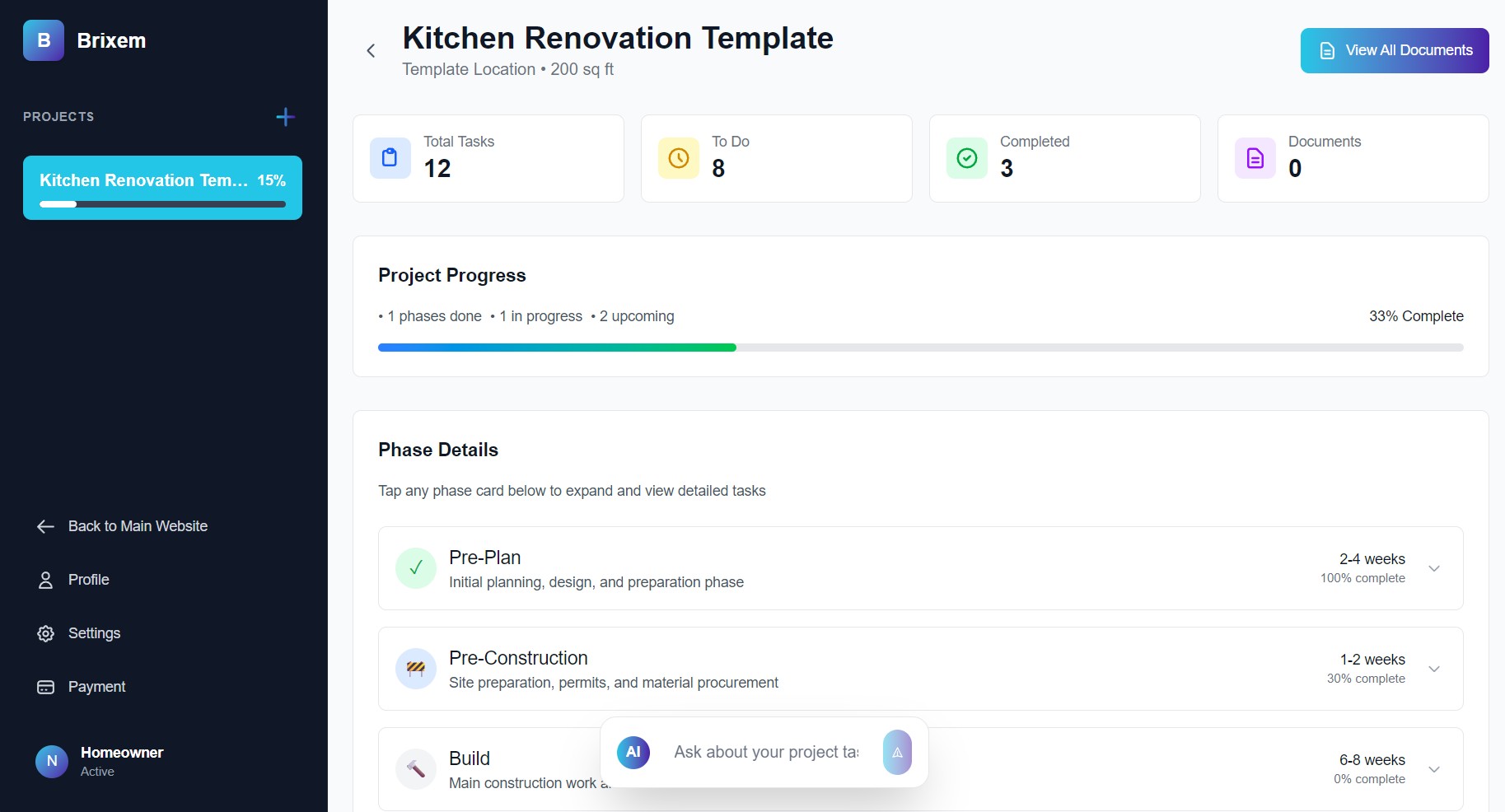
Track Not Started → In Progress → Done. Subtasks automatically roll up to update parent task and room-level progress indicators.
Room-Based Organization
Projects broken into rooms with individual progress roll-ups, budget tracking, and KPIs per room, mirroring how renovations actually work.
Progress & Budget KPIs
Dashboard surfaces total project progress, spent budget, tasks completed, and pending work at a glance via gradient progress bars and status badges.
Documents Panel
Store, preview, and link plans, invoices, photos, and files directly to specific tasks or rooms for instant context.
Quick Actions & Shortcuts
One-tap actions for scheduling, budget review, document access, and team communication, reducing clicks for the most common workflows.
Project Cards & Filtering
Search, filter, and navigate projects with quick view of status, progress percentage, and deadlines, designed for portfolios of multiple renovations.
Interactive Chat Input
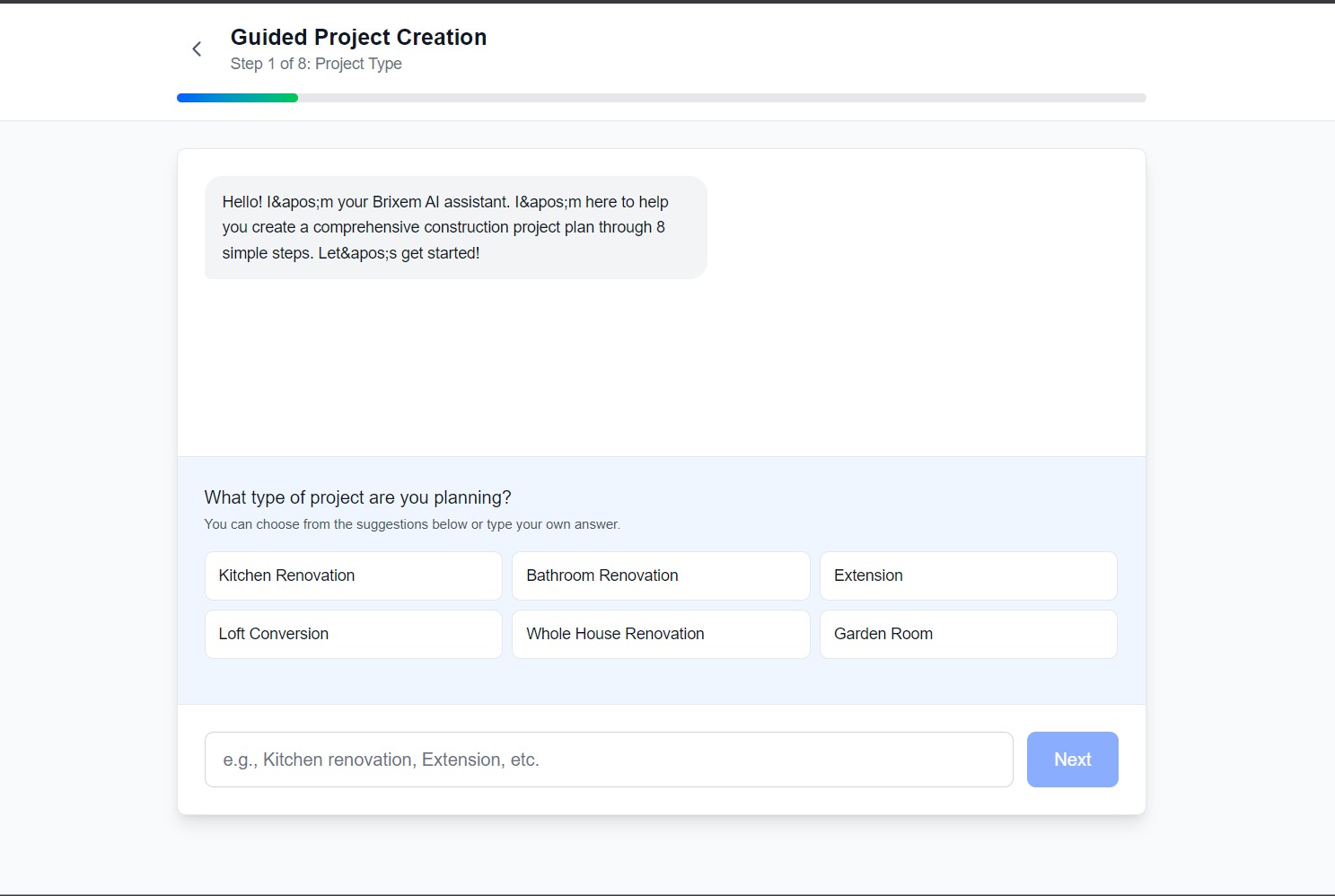
Attach files, use voice input, and auto-fill common queries with suggested questions, meeting users wherever they are in their project.
User Profile & Account
Track subscription tier, notifications, project count, storage usage, and team member management from a unified profile screen.
Feature Dashboard

04: Timeline

6 Months, Built to Last

Phase 01
Discovery & Research
Competitive analysis of renovation management tools (Houzz, CoConstruct, Buildertrend). Stakeholder workshops to define user archetypes: homeowner, contractor, and consultant. Mapped 12 core jobs-to-be-done and identified the central product gap: no single tool combined conversational AI with structured project tracking for renovation.
Months 1–1.5
Phase 02
Information Architecture & Design System
Defined the room-based project hierarchy and navigation model. Built the Brixem AI design system in Figma, including the cyan-to-indigo gradient language, component library, icon set, and visual identity guidelines covering color, typography, and geometric motifs.
Months 1.5–2.5
Phase 03
Wireframes & User Flow Mapping
Low-fidelity wireframes for all 9 core flows: onboarding, AI chat project creation, project dashboard, room view, task management, documents panel, budget tracking, profile/account, and mobile navigation. Validated with 10 participants across homeowner and contractor profiles.
Months 2.5–3.5
Phase 04
High-Fidelity Design
Applied the design system to 40+ screens covering desktop web and mobile views. Special focus areas: the AI chat interface with file/voice input, gradient progress bar system, room card architecture, and the project filtering/search experience.
Months 3.5–5
Phase 05
UX Testing, Iteration & Handoff
Interactive Figma prototype tested across two rounds with 18 total participants. Iterated on the AI input suggested questions, subtask progress propagation clarity, and mobile bottom navigation labeling. Full developer handoff with component specs, token documentation, and interaction guidelines.
Months 5–6

05: Goal

The Objective

Primary Goal
One place.
Every project.

The goal was to design a renovation planning experience so clear and intelligent that users never need to leave the dashboard. By combining an AI assistant that understands natural language with structured rooms, tasks, budgets, and progress tracking, Brixem AI becomes the single source of truth for every renovation project, regardless of the user's technical ability or experience with construction.

06: Challenge

What We Were Up Against

01 / Challenge
AI Output Must Feel Structured, Not Chaotic
Renovation projects have real stakes: budgets, contractors, deadlines. Designing a chat interface where AI creates rooms, tasks, and schedules that users immediately trust and understand (without feeling like a black box) required careful consideration of output presentation and confirmation patterns.
02 / Challenge
Progress Visibility Across Nested Hierarchies
Projects contain rooms. Rooms contain tasks. Tasks contain subtasks. Making progress "bubble up" visually, so that completing a subtask updates a task badge, which updates a room card, which updates the project KPI, required a precise design system for status states and progress indicators.
03 / Challenge
Same Product, Two Very Different Users
A homeowner managing their first renovation and a contractor juggling 10 projects have wildly different mental models. The dashboard had to present depth without demanding it, surfacing the right complexity level through progressive disclosure without building two separate products.

07: Process & Solution

How We Solved It

01
Conversation as a Creation Layer, Not Just a Chat
The AI chat was designed as the primary creation mechanism, not a support sidebar. When a user types "I want to renovate my kitchen in 3 months with a $25k budget," the AI generates a full project structure: a kitchen room with tasks, a schedule, and a budget allocation. Confirmation cards show the user exactly what was created before it commits, building trust in AI output.
02
Gradient Progress System: Status at a Glance
A unified visual language was designed for progress: cyan-to-indigo gradient bars, percentage badges, and color-coded status chips (Not Started / In Progress / Done). This system was applied consistently from subtask level up to the project overview card, creating an immediately readable health signal for any project, any room, any task.
03
Room Architecture as the Core Mental Model
Rather than a flat task list, the product uses rooms as the organizing layer, matching how homeowners naturally think about renovation ("What's happening in the kitchen? The bathroom?"). Each room card surfaces its own progress, budget spend, and active tasks, making the complexity of a full renovation instantly navigable.
04
Documents Tightly Coupled to Context
Files aren't dumped in a generic folder; they're linked directly to the room or task they belong to. A contractor's invoice appears on the relevant task. A floor plan sits on the room card. This context coupling means users find what they need without searching, and the AI can reference attached documents when answering project questions.
05
Progressive Disclosure for Two User Types
Quick Actions and summary KPIs were placed at the top for homeowners who want an instant read. Deeper task management, budget breakdowns, and filtering tools were positioned a level down, present when needed, invisible when not. UX testing confirmed that both novice and expert users completed core tasks without friction or feeling overwhelmed.
Final Screens

08: Results

The Outcome

40+
Screens delivered across web and mobile, covering all 9 core user flows
92%
Task success rate across core user journeys in final prototype testing
Faster project setup time vs. manual task entry, validated in UX testing
4.7
Clarity & ease-of-use score (out of 5) across 18 test participants

"For the first time, I could actually see my entire renovation in one place: budget, tasks, rooms, files. And I got there just by describing what I wanted to build."

Beta Participant, Homeowner, Kitchen & Bathroom Renovation